---
title: "What is Holon? Multiple agents working in your environment"
summary: "Assign recurring work to established roles, let agents follow up in the background, and reconnect when needed. An ongoing review example introduces Holon's local workbench for remote development and team collaboration."
order: 10
---
# What is Holon? Multiple agents working in your environment
 > The task instructions in this article illustrate how to use Holon; see the team case study for actual practice.
Holon is a local workbench where multiple agents can work on ongoing assignments. Run it on your computer or a remote development machine, with different agents handling development, review, documentation, and operations. Use a terminal or browser to assign work, check progress, and step in when needed.
Agents use the projects and tools on that machine. You can ask for a single change or assign an ongoing responsibility. When an agent needs to wait for tests, feedback, or human confirmation, it saves its progress and continues when the conditions are met.
## Why a workbench?
Many agent tools already write code, research questions, and run commands well. With Holon, we focus on making those capabilities part of everyday work. Can a reviewer retain its responsibilities and working agreements? When work pauses, can you find out what it is waiting for? If your development environment is remote, can you switch clients and keep using the same agent and project?
This affects how you organize work. You can maintain several agents with different responsibilities on one development machine and connect at any time. You can also give shared responsibilities such as investigation and review to shared agents on a team server, with results going into the team's existing issues and test records.
Moving from "help me review this" to "take ongoing responsibility for reviewing this repository" means keeping the role, project environment, and unfinished work available. Holon manages them together, so you can gradually turn one-off requests into ongoing responsibilities for established roles.
## Hand off work and reconnect when needed
Take ongoing review as an example: you want a reviewer to check a PR, follow later changes and CI, and merge it once agreed conditions are met, rather than just give one set of review comments. The following assignment illustrates this process.
### Find the agent responsible for this work
Open a client and choose an agent. Assign recurring work to established roles instead of starting each conversation without a division of responsibilities: a development agent makes changes, a reviewer checks risks, and a documentation agent maintains the docs.
Suppose you have already configured repository access for the reviewer and authorized it to merge a PR when review passes, CI meets the requirements, and no blocking feedback remains. Select it and give it the scope of this assignment:
> Follow this PR: 〈insert PR link〉, focusing on compatibility and regression risks. Run the necessary local checks, record issues, and follow up on changes. Before merging, recheck the latest commit, CI, and blocking feedback. Merge when the agreed conditions are met, and report the review and merge results. Ask me first about disputed trade-offs or any need to skip checks. Do not publish a release.
You do not need to explain all of the reviewer's responsibilities again. Long-term review standards and the scope of authorization can stay in its configuration; you only add what to check this time. The holon-reviewer and tuptup-reviewer we actually use both carry this responsibility for conditional merging. Creating a new reviewer does not give it the same authorization by default.
### Let it follow up in the background
The reviewer enters the project, reads the changes, uses local tools to run checks, and creates a work item for this ongoing follow-up, recording its objective, plan, and progress. After finding an issue, it leaves a review comment and waits for the developer to make changes. When a new commit arrives, it checks whether the issue has been resolved.
Work may pause while local tests run, CI finishes, or a developer prepares revisions. The reviewer keeps its progress and continues when results arrive; you do not have to watch the conversation and keep asking. To wake on GitHub CI results or new commits, configure the corresponding event integration. Until then, you can pass results to the agent yourself.
As long as the background service and host machine remain running, closing the terminal or browser does not end the assignment. Parts that do not require your judgment can keep moving forward. If a disputed compatibility trade-off comes up, the reviewer explains the problem and waits for your decision.
### Reconnect at any time to inspect and adjust the work
Handing work to the background should not mean that you can only wait for a result. You need to know how far it has progressed and where it is stuck, and you need a way to add judgment and adjust requirements. Holon's terminal TUI and Web GUI connect you to the original agent and work item, without making you recreate the task just to intervene.
Open the work item to see the plan, checklist, and reason for waiting. If it is waiting for CI, you can check progress and leave. If it needs you to decide the compatibility scope, add the requirement directly so it can continue. The screenshot below shows a reviewer that has checked the latest changes and is waiting for CI results.
> The task instructions in this article illustrate how to use Holon; see the team case study for actual practice.
Holon is a local workbench where multiple agents can work on ongoing assignments. Run it on your computer or a remote development machine, with different agents handling development, review, documentation, and operations. Use a terminal or browser to assign work, check progress, and step in when needed.
Agents use the projects and tools on that machine. You can ask for a single change or assign an ongoing responsibility. When an agent needs to wait for tests, feedback, or human confirmation, it saves its progress and continues when the conditions are met.
## Why a workbench?
Many agent tools already write code, research questions, and run commands well. With Holon, we focus on making those capabilities part of everyday work. Can a reviewer retain its responsibilities and working agreements? When work pauses, can you find out what it is waiting for? If your development environment is remote, can you switch clients and keep using the same agent and project?
This affects how you organize work. You can maintain several agents with different responsibilities on one development machine and connect at any time. You can also give shared responsibilities such as investigation and review to shared agents on a team server, with results going into the team's existing issues and test records.
Moving from "help me review this" to "take ongoing responsibility for reviewing this repository" means keeping the role, project environment, and unfinished work available. Holon manages them together, so you can gradually turn one-off requests into ongoing responsibilities for established roles.
## Hand off work and reconnect when needed
Take ongoing review as an example: you want a reviewer to check a PR, follow later changes and CI, and merge it once agreed conditions are met, rather than just give one set of review comments. The following assignment illustrates this process.
### Find the agent responsible for this work
Open a client and choose an agent. Assign recurring work to established roles instead of starting each conversation without a division of responsibilities: a development agent makes changes, a reviewer checks risks, and a documentation agent maintains the docs.
Suppose you have already configured repository access for the reviewer and authorized it to merge a PR when review passes, CI meets the requirements, and no blocking feedback remains. Select it and give it the scope of this assignment:
> Follow this PR: 〈insert PR link〉, focusing on compatibility and regression risks. Run the necessary local checks, record issues, and follow up on changes. Before merging, recheck the latest commit, CI, and blocking feedback. Merge when the agreed conditions are met, and report the review and merge results. Ask me first about disputed trade-offs or any need to skip checks. Do not publish a release.
You do not need to explain all of the reviewer's responsibilities again. Long-term review standards and the scope of authorization can stay in its configuration; you only add what to check this time. The holon-reviewer and tuptup-reviewer we actually use both carry this responsibility for conditional merging. Creating a new reviewer does not give it the same authorization by default.
### Let it follow up in the background
The reviewer enters the project, reads the changes, uses local tools to run checks, and creates a work item for this ongoing follow-up, recording its objective, plan, and progress. After finding an issue, it leaves a review comment and waits for the developer to make changes. When a new commit arrives, it checks whether the issue has been resolved.
Work may pause while local tests run, CI finishes, or a developer prepares revisions. The reviewer keeps its progress and continues when results arrive; you do not have to watch the conversation and keep asking. To wake on GitHub CI results or new commits, configure the corresponding event integration. Until then, you can pass results to the agent yourself.
As long as the background service and host machine remain running, closing the terminal or browser does not end the assignment. Parts that do not require your judgment can keep moving forward. If a disputed compatibility trade-off comes up, the reviewer explains the problem and waits for your decision.
### Reconnect at any time to inspect and adjust the work
Handing work to the background should not mean that you can only wait for a result. You need to know how far it has progressed and where it is stuck, and you need a way to add judgment and adjust requirements. Holon's terminal TUI and Web GUI connect you to the original agent and work item, without making you recreate the task just to intervene.
Open the work item to see the plan, checklist, and reason for waiting. If it is waiting for CI, you can check progress and leave. If it needs you to decide the compatibility scope, add the requirement directly so it can continue. The screenshot below shows a reviewer that has checked the latest changes and is waiting for CI results.
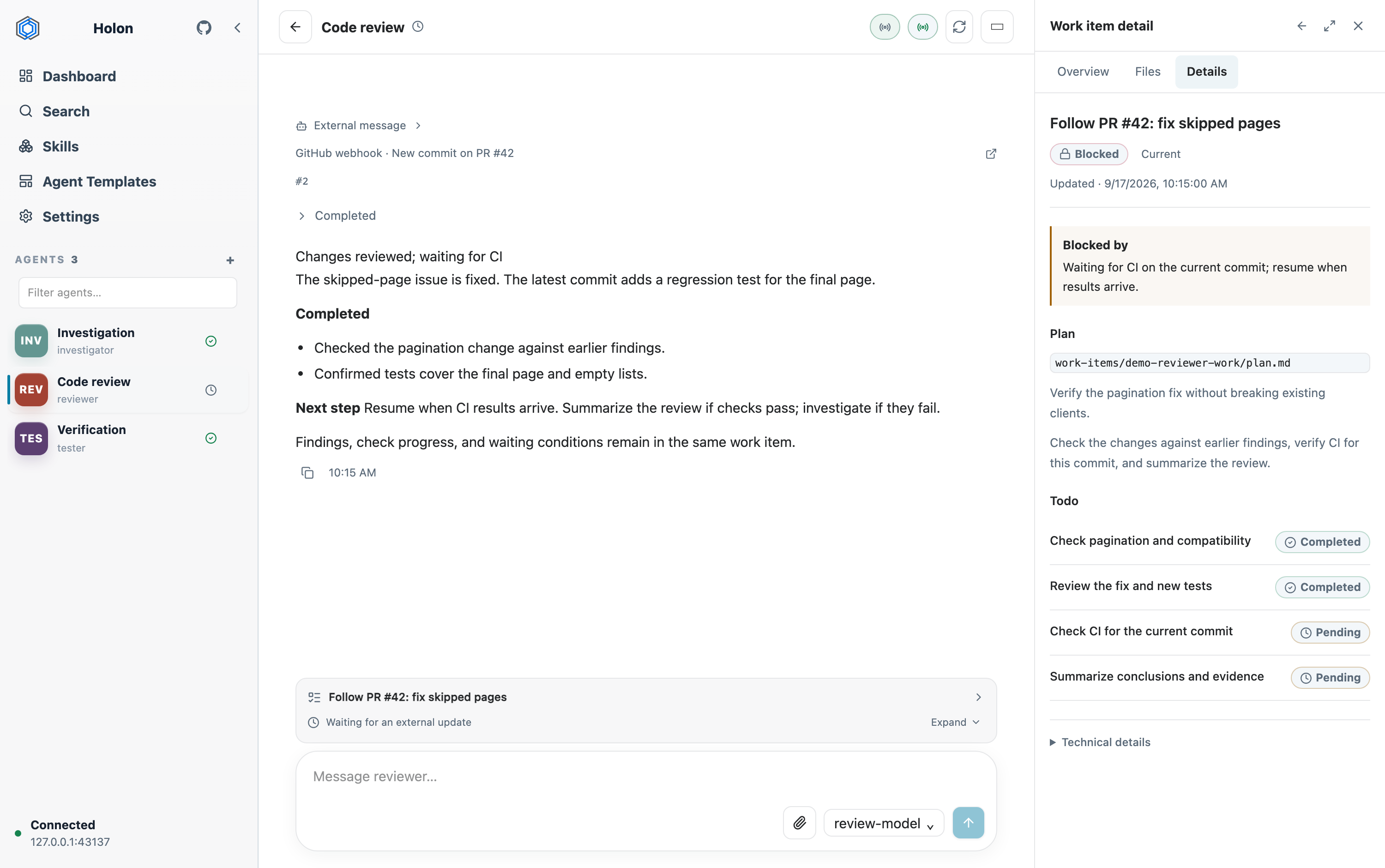 *Web workbench with demo data: changes reviewed, CI results pending, and the next steps saved in the same work item. Click the image to enlarge.*
If a compatibility decision is needed, for example, you can specify "keep the old interface and add regression tests." Then the reviewer follows later changes according to that requirement. The objective, existing findings, and remaining checks still belong to the same work item. If you separately authorize it to arrange a fix, it can also delegate changes to a child agent and review the returned results.
### Leave verifiable results when the work is complete
Once the merge conditions are met, the reviewer performs the authorized merge and reports which version it reviewed, how the issues were resolved, which checks passed, and where to find the PR and merge records. If it has not merged, it must explain which conditions remain unmet, rather than just reply "review complete."
Holon separates this completion report from the internal execution trace. From the report, you can reach the actual changes, test results, and work records. When you need to investigate a judgment, you can then look at tool output and the evidence behind the execution.
The completion report also marks the end of this assignment. The agent can take on the next review, while this assignment keeps its own record of scope and results.
## Make it part of daily work
A demo can finish in one window. Daily work needs roles, projects, and unfinished assignments to outlast that window. Here is how Holon supports that.
### Keep the environment running and switch clients
Holon's background runtime manages agent execution and work state. The terminal TUI and Web GUI are ways to connect to it. Projects and tools stay with the runtime environment, rather than with a particular client window.
This is straightforward for remote development: if compilers, repositories, and the test environment are already on the development machine, run the agent there. Whether you check results in a browser or continue giving instructions through a terminal, you connect to the same backend.
*Web workbench with demo data: changes reviewed, CI results pending, and the next steps saved in the same work item. Click the image to enlarge.*
If a compatibility decision is needed, for example, you can specify "keep the old interface and add regression tests." Then the reviewer follows later changes according to that requirement. The objective, existing findings, and remaining checks still belong to the same work item. If you separately authorize it to arrange a fix, it can also delegate changes to a child agent and review the returned results.
### Leave verifiable results when the work is complete
Once the merge conditions are met, the reviewer performs the authorized merge and reports which version it reviewed, how the issues were resolved, which checks passed, and where to find the PR and merge records. If it has not merged, it must explain which conditions remain unmet, rather than just reply "review complete."
Holon separates this completion report from the internal execution trace. From the report, you can reach the actual changes, test results, and work records. When you need to investigate a judgment, you can then look at tool output and the evidence behind the execution.
The completion report also marks the end of this assignment. The agent can take on the next review, while this assignment keeps its own record of scope and results.
## Make it part of daily work
A demo can finish in one window. Daily work needs roles, projects, and unfinished assignments to outlast that window. Here is how Holon supports that.
### Keep the environment running and switch clients
Holon's background runtime manages agent execution and work state. The terminal TUI and Web GUI are ways to connect to it. Projects and tools stay with the runtime environment, rather than with a particular client window.
This is straightforward for remote development: if compilers, repositories, and the test environment are already on the development machine, run the agent there. Whether you check results in a browser or continue giving instructions through a terminal, you connect to the same backend.
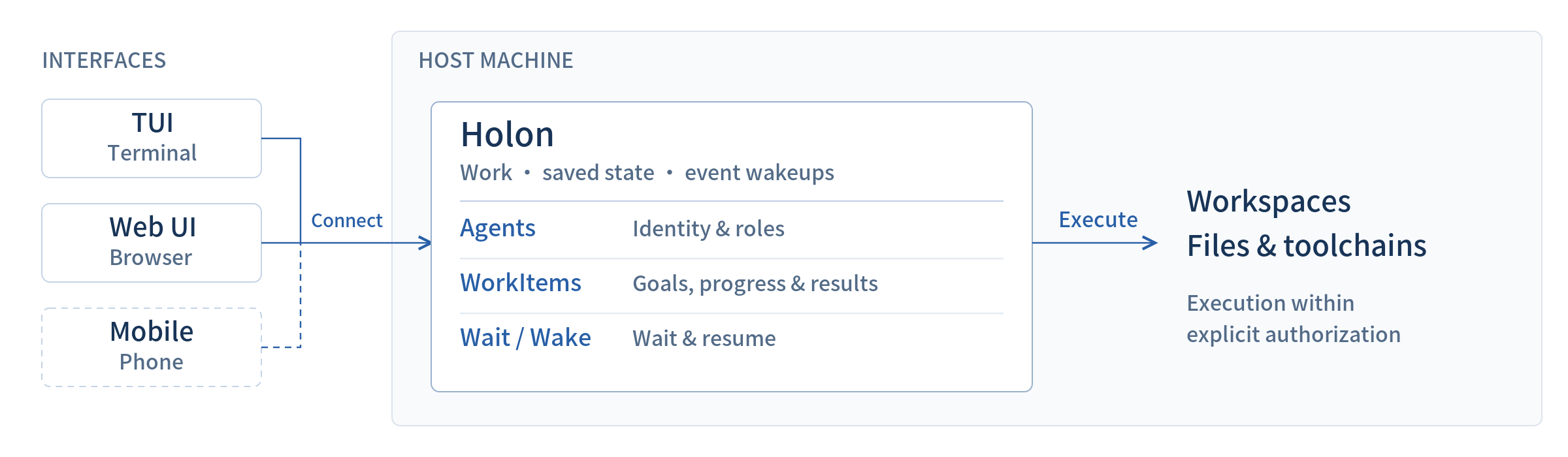 The backend and host must remain available. Closing a client and shutting down the runtime environment are different things. The machine boundary in the diagram shows where things run, not additional permission isolation.
Here, "local" means the machine running Holon, which can be a laptop or a remote server. You decide where projects, tools, and work records live.
### Why different roles, rather than just multiple chat windows?
Having two agents discuss the same code does not establish collaboration. Who makes the changes? Who judges whether those changes address the issues? Who decides when opinions differ? Without these agreements, another round of conversation may just repeat the argument.
Roles first need to define decision boundaries. The familiar PR workflow makes this clear: the development agent submits changes and responds to issues; the reviewer checks risks and verification evidence and judges whether merging is appropriate within its authorization. Disputed or out-of-scope trade-offs go to you. The earlier example authorized conditional merging, not publishing a release. These agreements come from the responsibilities you assign, not from the name "reviewer."
Separate roles also let work advance independently. While a development agent fixes an interface, a documentation agent can check usage instructions that are already stable. If a change tightly couples the frontend and backend, though, one agent may handle it more directly. Dividing the work is not worth an unnecessary handoff.
Long-term roles also have experience worth keeping. A testing agent can maintain regression scenarios that are easy to miss. An operations agent can record log locations, diagnostic steps, and operations that need human confirmation. These materials need revision as work happens; they support repeated collaboration better than explaining responsibilities from scratch each time.
### Keep roles and experience in AgentHome
Each agent has its own AgentHome to keep its responsibilities, memory, and materials. Its `AGENTS.md` can record the role contract: what it handles, what it can do directly, and what it must ask you to confirm. This file records existing authorization. Editing its text does not expand the agent's actual permissions.
Role agreements also differ from project rules. The reviewer's review responsibilities belong in its own AgentHome; how a repository builds and runs tests stays in the corresponding workspace. This lets it reuse its review methods in another project while following that project's specific requirements.
You can start from a template when creating a role. Reusable methods can become Skills, such as review steps, documentation checks, or log investigation. If you temporarily need an independent second look, you can delegate to a child agent and end that assignment after receiving the results, without maintaining a long-term role for every small task. For configuration, see the [Agent templates](/reference/agent-templates) and [Skills](/reference/skills) references (in English).
### Keep unfinished work and continue when conditions allow
In Holon, the agent persists over the long term, while individual pieces of work have a starting point and acceptance conditions. A WorkItem is the record of such work: it saves the objective, plan, progress, waiting conditions, and final completion report.
With this record, "waiting for test results" and "delivered" are different states. The agent yields execution while waiting. When task results, operator input, or integrated external events arrive, the runtime schedules it to continue. The model does not need to keep looping to ask whether results are ready.
This fits reviews spanning multiple rounds of feedback, as well as documentation, investigation, and acceptance work with staged confirmation. Ordinary questions can still end directly; explaining a command does not require a full work item.
WorkItem does not guarantee infinite context or lossless recovery. Its records need ongoing maintenance so agents and people can check whether the objective has changed and whether the next step still makes sense. For what is saved and how waiting works, see [Holon's WorkItem architecture: separating work state from conversation](/blog/why-work-items).
## Let agents work directly in your projects
Agents can directly use the repositories, shell, and toolchain on the machine running Holon. After connecting to an existing project, an agent follows project rules to edit files and run tests. After drafting documentation, it can build the site to check pages. You receive actual workspace changes and verification results that you can continue to edit, review, or commit.
One agent can bind multiple workspaces and switch between them. For example, adding an interface may require first changing the server, then updating the SDK, and finally adjusting the application that uses it. A development agent can work toward the same objective through each repository's changes and verification. Each project's code, build methods, and guidance files stay in its own directory. When changes need isolation, it can also create a separate Git worktree for the corresponding repository. See the [workspace reference](/reference/workspaces) (in English) for details.
Models and image tools can be configured for the work, for example to prepare illustrations for documentation or read page screenshots for inspection. When using remote models, requests still go to the corresponding services, so choose models and the material you send according to the project's data requirements. See the [model reference](/reference/models), [image understanding](/reference/view-image), and [image generation](/reference/image-generation) reference pages (in English) for supported capabilities and required credentials.
## Teams share responsibilities and work results
Individuals can use Holon to organize their remote development environments. Teams can put shared roles on a server so members can hand off the same piece of work, rather than each person investigating from scratch. Role assignments do not replace system permissions or access controls. The deployer must still manage the server's network, credentials, and actual access scope.
In [Agent Native practices in a small team](/blog/agents-in-a-small-team), shared agents already handle investigation, review, operations, and acceptance follow-up. After a device failure, the investigation agent analyzes logs and issue records and writes its findings to a GitHub issue. When a fixed version is ready to test, the testing agent resumes the checks, hands the steps that require physical device operation to testers, and picks up their feedback.
Collaboration here happens in the team's existing work records. Developers keep using their own coding tools, agents follow shared responsibilities, and testers operate devices. How work is received, where results go, and whom to contact when blocked all need explicit arrangements. The fourth article records these specific handoffs, not just the number of agents in the team.
If you want to try a narrower responsibility first, start with the ongoing review workflow in [One PR, one work item](/blog/one-pr-one-work-item), then add roles as your team needs them.
## Start with one agent and a new project
You do not need a project before starting an agent. Follow [Your first agent](/getting-started/first-agent) to install Holon, configure a model, and create an agent. Then ask it to create the project you want to maintain:
> Help me create a personal notes website. First propose a minimal plan and project directory. Wait for my confirmation before initializing a Git repository, attaching the project as your workspace, and switching to it. Complete a homepage I can preview locally. Run the necessary checks and tell me how to preview it. Do not publish it publicly.
After receiving the plan, you can disconnect the client, reconnect later, and find the original agent and work item. Confirm the plan and directory, and let it continue creating the project, attaching the workspace, and completing the homepage. Finally, preview it as instructed and check that the files were written to the new repository and verification passed.
You can try this without setting up GitHub events. Review the plan, confirm it, and let the agent create the project and continue the work. The agent remains available after the project is complete, ready to maintain the site or take on another project.
The backend and host must remain available. Closing a client and shutting down the runtime environment are different things. The machine boundary in the diagram shows where things run, not additional permission isolation.
Here, "local" means the machine running Holon, which can be a laptop or a remote server. You decide where projects, tools, and work records live.
### Why different roles, rather than just multiple chat windows?
Having two agents discuss the same code does not establish collaboration. Who makes the changes? Who judges whether those changes address the issues? Who decides when opinions differ? Without these agreements, another round of conversation may just repeat the argument.
Roles first need to define decision boundaries. The familiar PR workflow makes this clear: the development agent submits changes and responds to issues; the reviewer checks risks and verification evidence and judges whether merging is appropriate within its authorization. Disputed or out-of-scope trade-offs go to you. The earlier example authorized conditional merging, not publishing a release. These agreements come from the responsibilities you assign, not from the name "reviewer."
Separate roles also let work advance independently. While a development agent fixes an interface, a documentation agent can check usage instructions that are already stable. If a change tightly couples the frontend and backend, though, one agent may handle it more directly. Dividing the work is not worth an unnecessary handoff.
Long-term roles also have experience worth keeping. A testing agent can maintain regression scenarios that are easy to miss. An operations agent can record log locations, diagnostic steps, and operations that need human confirmation. These materials need revision as work happens; they support repeated collaboration better than explaining responsibilities from scratch each time.
### Keep roles and experience in AgentHome
Each agent has its own AgentHome to keep its responsibilities, memory, and materials. Its `AGENTS.md` can record the role contract: what it handles, what it can do directly, and what it must ask you to confirm. This file records existing authorization. Editing its text does not expand the agent's actual permissions.
Role agreements also differ from project rules. The reviewer's review responsibilities belong in its own AgentHome; how a repository builds and runs tests stays in the corresponding workspace. This lets it reuse its review methods in another project while following that project's specific requirements.
You can start from a template when creating a role. Reusable methods can become Skills, such as review steps, documentation checks, or log investigation. If you temporarily need an independent second look, you can delegate to a child agent and end that assignment after receiving the results, without maintaining a long-term role for every small task. For configuration, see the [Agent templates](/reference/agent-templates) and [Skills](/reference/skills) references (in English).
### Keep unfinished work and continue when conditions allow
In Holon, the agent persists over the long term, while individual pieces of work have a starting point and acceptance conditions. A WorkItem is the record of such work: it saves the objective, plan, progress, waiting conditions, and final completion report.
With this record, "waiting for test results" and "delivered" are different states. The agent yields execution while waiting. When task results, operator input, or integrated external events arrive, the runtime schedules it to continue. The model does not need to keep looping to ask whether results are ready.
This fits reviews spanning multiple rounds of feedback, as well as documentation, investigation, and acceptance work with staged confirmation. Ordinary questions can still end directly; explaining a command does not require a full work item.
WorkItem does not guarantee infinite context or lossless recovery. Its records need ongoing maintenance so agents and people can check whether the objective has changed and whether the next step still makes sense. For what is saved and how waiting works, see [Holon's WorkItem architecture: separating work state from conversation](/blog/why-work-items).
## Let agents work directly in your projects
Agents can directly use the repositories, shell, and toolchain on the machine running Holon. After connecting to an existing project, an agent follows project rules to edit files and run tests. After drafting documentation, it can build the site to check pages. You receive actual workspace changes and verification results that you can continue to edit, review, or commit.
One agent can bind multiple workspaces and switch between them. For example, adding an interface may require first changing the server, then updating the SDK, and finally adjusting the application that uses it. A development agent can work toward the same objective through each repository's changes and verification. Each project's code, build methods, and guidance files stay in its own directory. When changes need isolation, it can also create a separate Git worktree for the corresponding repository. See the [workspace reference](/reference/workspaces) (in English) for details.
Models and image tools can be configured for the work, for example to prepare illustrations for documentation or read page screenshots for inspection. When using remote models, requests still go to the corresponding services, so choose models and the material you send according to the project's data requirements. See the [model reference](/reference/models), [image understanding](/reference/view-image), and [image generation](/reference/image-generation) reference pages (in English) for supported capabilities and required credentials.
## Teams share responsibilities and work results
Individuals can use Holon to organize their remote development environments. Teams can put shared roles on a server so members can hand off the same piece of work, rather than each person investigating from scratch. Role assignments do not replace system permissions or access controls. The deployer must still manage the server's network, credentials, and actual access scope.
In [Agent Native practices in a small team](/blog/agents-in-a-small-team), shared agents already handle investigation, review, operations, and acceptance follow-up. After a device failure, the investigation agent analyzes logs and issue records and writes its findings to a GitHub issue. When a fixed version is ready to test, the testing agent resumes the checks, hands the steps that require physical device operation to testers, and picks up their feedback.
Collaboration here happens in the team's existing work records. Developers keep using their own coding tools, agents follow shared responsibilities, and testers operate devices. How work is received, where results go, and whom to contact when blocked all need explicit arrangements. The fourth article records these specific handoffs, not just the number of agents in the team.
If you want to try a narrower responsibility first, start with the ongoing review workflow in [One PR, one work item](/blog/one-pr-one-work-item), then add roles as your team needs them.
## Start with one agent and a new project
You do not need a project before starting an agent. Follow [Your first agent](/getting-started/first-agent) to install Holon, configure a model, and create an agent. Then ask it to create the project you want to maintain:
> Help me create a personal notes website. First propose a minimal plan and project directory. Wait for my confirmation before initializing a Git repository, attaching the project as your workspace, and switching to it. Complete a homepage I can preview locally. Run the necessary checks and tell me how to preview it. Do not publish it publicly.
After receiving the plan, you can disconnect the client, reconnect later, and find the original agent and work item. Confirm the plan and directory, and let it continue creating the project, attaching the workspace, and completing the homepage. Finally, preview it as instructed and check that the files were written to the new repository and verification passed.
You can try this without setting up GitHub events. Review the plan, confirm it, and let the agent create the project and continue the work. The agent remains available after the project is complete, ready to maintain the site or take on another project.